Identity and access management
One identity layer.Every access, decided.
Secure sign-in for every person and service, across your apps, APIs and networks. Authentifort adapts to each sign-in and asks for more proof only when something looks different.
Illustration: every sign-in passes through Authentifort, which opens access to one application at a time. The scenarios shown are illustrative.
- ContextPending
- MethodPending
Built on open standards
- OIDC
- OAuth 2.0
- SAML 2.0
- WebAuthn
- FIDO2
- RADIUS
Sign-in methods
From passwords to passkeys, at your pace.
Offer the methods your people already use, then move them toward passkeys when you are ready.
A password plus a one-time code by email, WhatsApp or SMS, or from an authenticator app.
Email · WhatsApp · SMS · Authenticator app
Authenti4 Guardian
Approve a sign-in with one tap.
Number matching on the phone means a stray tap never lets someone else in.
- 01An employee signs in to Payroll portalThe password is right. The browser shows a number and sends a request to their phone.
- 02Guardian shows the requestApplication, location and device appear on screen. They pick the matching number.
- 03Signed inThe browser continues to Payroll portal. "No, it's not me" would stop the sign-in.
Adaptive authentication
Decide in context.
One person, three sign-ins, three different answers. Trusted sign-ins go straight through; more proof is asked for only when something changes.
- DeviceKnown device
- LocationUsual location
- Travel since last sign-inPlausible
- IP reputationGood reputation
- Dubai, AE (9)
- Abu Dhabi, AE (6)
- Riyadh, SA (5)
- Doha, QA (3)
- Cairo, EG (3)
- London, GB (6)
- Paris, FR (4)
- Frankfurt, DE (4)
- Mumbai, IN (5)
- Singapore, SG (4)
- Nairobi, KE (2)
- New York, US (4)
- Toronto, CA (2)
- Sydney, AU (2)
Geo-aware
See where every sign-in comes from. Decide where it can.
- Country rulesAllow or deny by country, per application.
- Anonymizer detectionFlag or block VPN, Tor and hosting networks.
- Before the passwordA denied location stops at the first step.
Access
Open the right doors.
Once someone is verified, one identity opens their apps, their directories and the network, and nothing else.
Single sign-on
One sign-in. Only the right apps.
Roles and groups decide which applications each person sees after one sign-in.
- Google WorkspaceEmail and docs
- Microsoft 365Email and docs
- SlackChat
- SalesforceSales
- GitHubCodeNot included
- JiraProjectsNot included
- AWSCloudNot included
- VPN gatewayNetworkNot included
Federation
Keep your directories. Add one sign-in on top.
People stay where they are today: your company directory, a partner’s company, or an account they already have. Nothing has to move first.
- Nothing to migrate
- Leavers lose access when the directory says so
Network authentication
Every device on your network asks one place.
VPN, Wi‑Fi, wired ports, switches, routers and firewalls all check with Authentifort over RADIUS. People and admins use their own account, and every connection lands in one log.
Solutions
Identity that fits how you work.
Start with the problem in front of you. Each solution uses the same identity layer underneath.
All solutions



Admin console
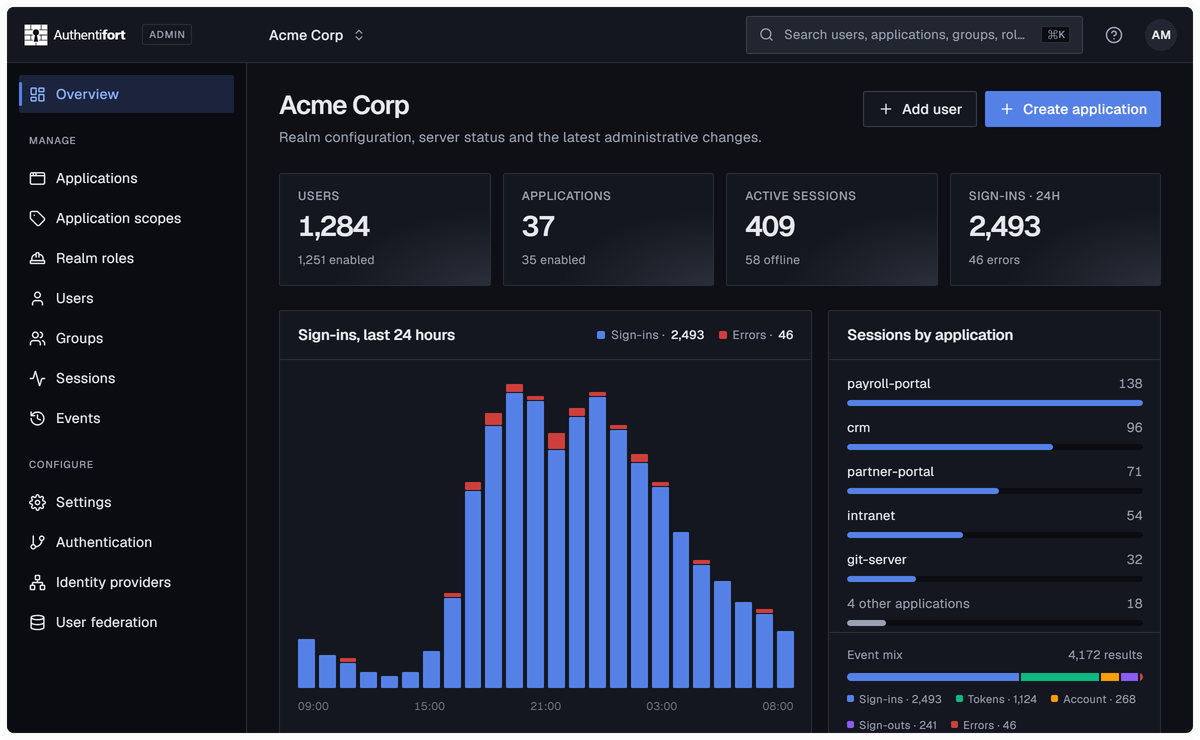
Every layer of access, run from one console.
Users, applications, policies and sessions for every realm, managed and audited in one place.
Get started
Start with one application.
We’ll walk you through Authentifort on your own setup. Or explore the live demo first, no sign-up needed.